Introduction
Many people confuse modems, routers, and gateway devices because they often look similar and work together in a home network. However, they serve different roles. A Modem Router combines two essential functions in one device: it connects to the internet service provider and distributes the connection to devices through WiFi or Ethernet. A standalone router works differently and requires a separate modem to receive internet signals first. Understanding the difference between these two setups helps users build a faster and more reliable network. In this article, you will learn how each system works and which option best fits your networking needs.
Modem Router vs Standalone Router — Key Differences Explained
Device Structure and Hardware Design
Understanding the structural differences between a Modem Router and a standalone modem-router setup helps clarify how each system handles connectivity, hardware integration, and network management. The comparison below highlights architecture, connectivity interfaces, practical deployment scenarios, and technical characteristics that influence network design.
| Category | Modem Router (Integrated Gateway) | Separate Modem + Standalone Router |
| Hardware Architecture | Single device combining modem chipset and router processor | Two independent devices: modem handles signal conversion, router manages LAN |
| Core Function | Performs modulation/demodulation and packet routing within one enclosure | Modem translates ISP signal; router distributes traffic across network |
| ISP Connection Interface | Depends on service type: DOCSIS coaxial cable, DSL RJ-11, fiber ONT Ethernet | Modem connects to ISP line; router connects to modem via Ethernet (RJ-45) |
| Typical WAN Port | 1 WAN interface integrated internally (DOCSIS/DSL/Fiber) | 1 WAN Ethernet port on router connected to modem |
| LAN Ethernet Ports | Usually 2–4 Gigabit Ethernet ports (10/100/1000 Mbps) | Routers typically provide 4 LAN ports (10/100/1000 Mbps), sometimes multi-gig |
| WiFi Integration | Built-in wireless access point | WiFi handled entirely by the router |
| WiFi Standards | Often Wi-Fi 5 (802.11ac) or Wi-Fi 6 (802.11ax) depending on model | Router may support Wi-Fi 6, Wi-Fi 6E, or Wi-Fi 7 |
| Frequency Bands | Dual-band: 2.4 GHz and 5 GHz | Dual-band or tri-band: 2.4 GHz, 5 GHz, optional 6 GHz |
| Maximum WiFi Throughput | Wi-Fi 5 theoretical max ≈ 3.5 Gbps, Wi-Fi 6 up to ≈ 9.6 Gbps | Wi-Fi 6 up to ≈ 9.6 Gbps, Wi-Fi 7 theoretical ≈ 46 Gbps |
| Device Integration Level | High integration; modem and router share internal bus | Modular architecture; devices communicate through Ethernet |
| Installation Complexity | Low; ISP line connects directly to device | Moderate; modem must connect to router before devices |
| Cable Requirements | ISP cable + power cable | ISP cable + Ethernet cable + two power adapters |
| Physical Hardware Units | 1 device | 2 devices |
| Network Processing | Single chipset handles both modem and routing tasks | Dedicated routing CPU often higher performance |
| Typical Use Case | Small homes, apartments, ISP-provided equipment | Large homes, business networks, advanced users |
| Upgrade Method | Entire device replaced when upgrading | Router or modem can be upgraded independently |
| Network Scalability | Moderate expansion capability | High scalability; compatible with mesh or enterprise routers |
Tip:When designing a network for high-speed internet plans (1 Gbps or higher), check whether the router supports Gigabit or multi-gigabit WAN ports; otherwise the network may not fully utilize the available bandwidth.
Internet Connection Workflow
The internet connection process differs slightly between a Modem Router and a standalone router setup. With a modem-router combo, the incoming signal from the ISP enters the device through a cable, fiber, or DSL line. The modem component translates that signal into digital data, and the router component immediately distributes the data to connected devices through WiFi or Ethernet. In a standalone configuration, the process occurs in two steps. First, the modem converts the ISP signal into data. Then the router receives this data through an Ethernet connection and manages how it is shared across the network. Although both systems ultimately deliver internet connectivity to devices, the modem-router combo performs the entire process internally while the standalone system relies on two separate devices working together.
Network Management and Feature Control
Network management also varies between these two configurations. A Modem Router typically provides a unified interface where users manage WiFi settings, security options, and device connections from a single dashboard. This simplified control panel allows quick setup and easy network monitoring. Standalone routers, on the other hand, often offer more advanced management features because they focus solely on routing functions. Dedicated routers frequently include advanced tools such as traffic prioritization, bandwidth allocation, parental controls, and VPN support. These features allow users to customize network performance and security in greater detail, making standalone routers particularly useful for larger households or professional environments that require greater network control.
How a Modem Router Works in a Home Network
Connecting Your ISP to Your Local Network
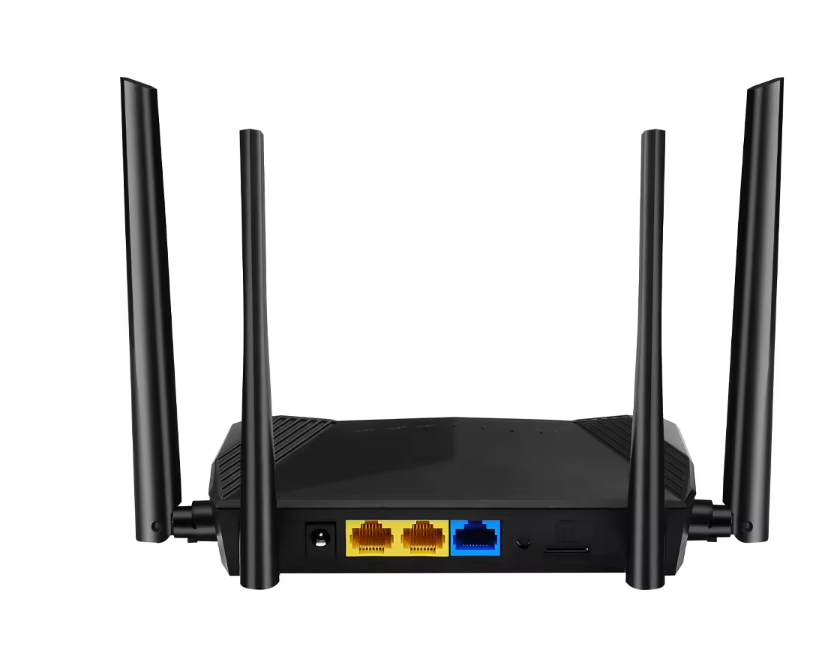
A Modem Router acts as the central gateway between the internet service provider and the devices within a home or office network. When the ISP delivers internet signals through cable, fiber, or DSL infrastructure, the modem component inside the device receives and decodes the signal. This conversion transforms the ISP signal into digital data that computers, smartphones, and other connected devices can understand. Once the data is translated, the router portion of the device distributes the connection across the network. Because both processes occur within a single device, the modem-router combo provides a streamlined connection path between the external internet and the internal network.
Built-in WiFi Distribution
After receiving internet data from the ISP, the Modem Router broadcasts wireless signals that allow multiple devices to connect simultaneously. This wireless network enables smartphones, laptops, smart TVs, tablets, and other connected devices to access the internet without using physical cables. The router component manages communication between devices and ensures that incoming and outgoing data packets are delivered correctly. Modern modem-router gateways often support dual-band or tri-band WiFi technologies, allowing them to handle multiple devices and high-bandwidth activities such as video streaming, online gaming, and cloud-based work applications.
Simplified Networking Through an All-in-One Device
One major advantage of using a Modem Router is the simplicity it offers during installation and daily use. Because the modem and router functions are integrated into one device, users only need to set up a single piece of hardware when establishing an internet connection. The ISP cable connects directly to the device, and once it is powered on, the gateway begins broadcasting WiFi across the home or office. Configuration is also easier because all network settings are managed from a single interface. Firmware updates, security settings, and device management tasks can all be handled in one place, making the network easier to maintain and operate.
How a Standalone Router Works With a Separate Modem
Role of the Modem in Internet Signal Translation
In a separate networking setup, the modem performs the critical function of translating signals from the internet service provider into digital data that devices can use. The modem connects directly to the ISP through cable lines, fiber infrastructure, or DSL connections. When data travels from the internet to the home network, the modem converts the signal into a format that routers and devices can understand. Without this translation process, computers and smartphones would not be able to communicate with external internet servers. After the modem converts the signal, the data is transmitted through an Ethernet cable to the router, which continues the distribution process.
Standalone Router as the Network Traffic Manager
Once the router receives internet data from the modem, it becomes responsible for managing the flow of network traffic within the home or office. The router assigns unique IP addresses to connected devices and directs data packets to their correct destinations. Wireless routers also broadcast WiFi signals so that multiple devices can connect to the network simultaneously. In addition to distributing internet access, routers coordinate communication between devices within the local network, allowing computers to share files, printers, or other connected equipment. Because the router focuses solely on network traffic management, it often includes advanced technologies that improve speed, coverage, and network efficiency.
Creating a Local Area Network for Multiple Devices
A standalone router also establishes a local area network (LAN) that connects multiple devices within the same environment. Once connected to the modem, the router distributes internet access to smartphones, laptops, gaming consoles, smart home devices, and office equipment. Each device receives a unique local IP address, allowing the router to identify and manage data requests accurately. This structure enables dozens of devices to share a single internet connection while maintaining stable communication across the network. By organizing traffic and directing data to the correct device, the router ensures efficient connectivity across the entire household or workplace.
Advantages of Using a Modem Router Combo
Streamlined Setup and Fewer Devices
A Modem Router simplifies network installation by combining two essential devices into a single unit. Users connect the ISP cable directly to the gateway device, power it on, and configure the WiFi network through a simple setup process. Because the modem and router components work inside the same hardware, there is no need to connect multiple devices with Ethernet cables. This streamlined setup reduces hardware complexity and makes it easier for users to establish an internet connection quickly. For homes and small offices that prioritize convenience, this integrated design offers a practical networking solution.
Space-Saving Networking Equipment
Another advantage of a Modem Router is its compact design. Instead of placing both a modem and a router on a desk or shelf, users only need one device to handle the entire network connection. This reduces hardware clutter and keeps the networking area organized. The integrated design also minimizes the number of cables and power adapters required to operate the network. For apartments, small offices, and limited workspace environments, a modem-router combo helps maintain a clean and efficient setup while still delivering reliable internet connectivity.
Convenient Network Management
Managing a network through a Modem Router is often easier because all configuration options are located within a single interface. Users can access a web-based control panel or mobile application to adjust WiFi names, passwords, and security settings. The system also displays connected devices and network activity, allowing users to monitor their network easily. Because the modem and router functions are integrated, updates and configuration changes apply to the entire network at once. This centralized management approach reduces complexity and makes it easier to maintain a secure and stable network.
Advantages of Using a Standalone Router With a Modem
Higher Performance Networking Options
Standalone routers are often designed with performance as the primary focus. Many modern routers include powerful processors, advanced antennas, and high-speed wireless technologies such as WiFi 6 or WiFi 7. These features improve signal strength, expand coverage, and support multiple devices simultaneously without performance degradation. For households with many connected devices or high-bandwidth activities such as streaming, gaming, and remote work, a dedicated router can deliver stronger and more stable wireless connectivity across the network.
Greater Flexibility for Network Customization
Standalone routers also provide greater flexibility when it comes to network configuration. Because they are dedicated to routing tasks, they often include advanced tools that allow users to customize how data flows across the network. Features such as quality-of-service controls, guest networks, device prioritization, and VPN compatibility allow administrators to optimize performance and security. These customization options are particularly useful for businesses, home offices, and technology enthusiasts who need precise control over their network environment.
Easy Equipment Upgrades
Using separate devices also makes it easier to upgrade networking equipment over time. When internet speeds increase or new wireless technologies become available, users can replace their router without changing the modem. Similarly, if the ISP updates its connection technology, the modem can be upgraded independently while the router remains in place. This flexibility allows networks to evolve gradually and ensures that users can adopt new technologies without replacing their entire networking system.
Choosing Between a Modem Router and a Standalone Router
Best Choice for Small Homes and Simple Networks
For smaller households or offices with basic networking needs, a Modem Router often provides the most convenient solution. The all-in-one design simplifies installation and reduces the number of devices required to establish an internet connection. Users can set up the network quickly without extensive technical knowledge. This makes modem-router combos ideal for apartments, small homes, or environments where only a moderate number of devices connect to the network.
Best Setup for Large Homes or Heavy Internet Usage
Larger homes and busy networks often benefit from using a standalone router with a separate modem. Dedicated routers can deliver stronger wireless signals and handle a greater number of connected devices. They also support advanced networking technologies that improve performance across larger spaces. In some cases, users combine standalone routers with mesh networking systems to extend WiFi coverage throughout multiple rooms or floors. This configuration ensures that every area of the home receives stable internet access.
Future-Ready Networking Considerations
When selecting networking equipment, users should also consider long-term scalability. As internet speeds increase and more smart devices connect to home networks, the demand for reliable connectivity continues to grow. Choosing hardware that supports modern WiFi standards and high-speed internet plans ensures that the network remains efficient in the future. Whether using a Modem Router or a standalone router setup, selecting equipment designed for future technologies helps maintain stable performance as network demands evolve.
Practical Network Setup Examples
Basic Home Internet Setup With a Modem Router
A basic home network often uses a Modem Router as the central gateway device. In this configuration, the ISP cable connects directly to the modem-router unit, which then broadcasts WiFi across the home. Smartphones, laptops, tablets, and smart TVs connect to the wireless network without requiring additional hardware. This setup works particularly well in apartments or small homes where the wireless signal can easily reach every room. The result is a simple, efficient network that supports everyday activities such as browsing, streaming, and video calls.
Advanced Home Network Using Modem and Standalone Router
More advanced networking environments typically use separate devices for the modem and router. The modem connects directly to the ISP infrastructure and converts incoming signals into digital data. The standalone router then connects to the modem and distributes internet access throughout the home. High-performance routers often include advanced antennas and powerful processors that improve signal coverage and network stability. This configuration is commonly used by gamers, remote workers, and households with many connected devices.
Expanding Coverage With Mesh Routers
Mesh WiFi systems are designed to extend wireless coverage in large homes, offices, or multi-floor buildings. Instead of relying on one router, the network uses multiple nodes that work together to provide continuous connectivity and consistent signal strength across the entire space.
| Category | Mesh Router System | Practical Explanation / Technical Details |
| Network Architecture | Multi-node distributed WiFi network | Consists of one primary router connected to the modem and multiple satellite nodes placed around the building |
| Typical Coverage Range | 2-node system: ~3,000–4,000 sq ft (280–370 m²) | Coverage depends on building materials and node placement |
| Large Coverage Deployment | 3-node system: ~5,000–6,000 sq ft (460–560 m²) | Suitable for multi-floor homes or medium office spaces |
| Node Placement Distance | Recommended spacing: 9–15 m (30–50 ft) between nodes | Prevents signal overlap while maintaining stable backhaul connection |
| Frequency Bands | Dual-band: 2.4 GHz + 5 GHz; Tri-band: adds second 5 GHz or 6 GHz | Tri-band systems often dedicate one band for node-to-node communication |
| WiFi Standards | Wi-Fi 5 (802.11ac), Wi-Fi 6 (802.11ax), Wi-Fi 6E (802.11ax with 6 GHz) | Wi-Fi 6E adds 6 GHz band for reduced congestion |
| Maximum Theoretical Throughput | Wi-Fi 5 ≈ 3.5 Gbps, Wi-Fi 6 ≈ 9.6 Gbps | Actual speeds depend on ISP bandwidth and device capability |
| Backhaul Connection | Wireless backhaul or wired Ethernet backhaul | Ethernet backhaul (1 Gbps or higher) improves stability and speed |
| Node Hardware | Each node contains router CPU, radios, and antennas | Many systems use quad-core processors around 1–1.5 GHz |
| Antenna Configuration | Typically 4–8 internal antennas per node | Enhances signal distribution and beamforming |
| Device Roaming | Seamless roaming via 802.11k / 802.11v / 802.11r protocols | Allows devices to switch nodes automatically without disconnecting |
| Device Capacity | Often supports 50–200+ devices per system | Depends on router CPU and WiFi standard |
| Typical Applications | Large homes, offices, multi-story buildings | Ideal for environments with WiFi dead zones |
| Interference Handling | Automatic channel selection and band steering | Optimizes signal paths and reduces congestion |
| Installation Requirements | One node connects to modem via Ethernet (RJ-45) | Additional nodes only require power supply |
Tip:For best mesh performance, place nodes in open areas rather than near thick concrete walls or metal structures, since materials like reinforced concrete can reduce WiFi signal strength by 30–50%.
Conclusion
A Modem Router integrates modem and routing functions into one device, making installation simple and network management efficient. A standalone router works with a separate modem, allowing each device to focus on its specific task and support flexible network expansion. Understanding these differences helps users choose the right setup based on network size, device number, and performance needs. Zhengzhou LEHENG Electronic Technology Co., Ltd. offers reliable networking products designed for stable connectivity, efficient deployment, and modern home or business network environments.
FAQ
Q: What is a Modem Router?
A: A Modem Router combines modem and routing functions in one device.
Q: How does a Modem Router differ from a standalone router?
A: A Modem Router works alone; standalone routers need a modem.
Q: Why choose a Modem Router?
A: A Modem Router simplifies setup and network management.
Q: Can a standalone router work without a modem?
A: No. A standalone router requires a modem connection.
Q: Which is better for small homes?
A: A Modem Router often suits simple home networks.


 External GPS Antenna
  Ceramic antenna
  Internal GPS Antenna
  Surveying Antenna
 Magnet Antenna
  Patch Antenna
  Rubber Antenna
  Screw Antenna
  Spring Antenna
  Other Indoor Coverage Antenna&outdoor Wlan Antenna
 2.4G Antenna
  5.8G Antenna

 Outdoor Yagi TV Antenna


 Ceiling mount antenna
  Wall mount panel antenna
 Fiberglass Antenna
  Panel Antenna
  Parabolic Antenna
  Yagi Antenna


