

Views: 0 Author: Site Editor Publish Time: 2026-03-30 Origin: Site


▲Introduction: Solving Rural Internet Challenges
Access to reliable internet remains a major challenge in rural and remote areas. Traditional wired solutions such as fiber or DSL are often unavailable due to high infrastructure costs and geographical limitations.
As a result, many businesses, farms, and households turn to wireless bridge technology as a practical and cost-effective solution.

A properly configured wireless bridge can deliver:
●Stable long-distance connectivity
●High-speed data transmission
●Low deployment cost
●Flexible scalability
▲What Is a Wireless Bridge?
A wireless bridge is a network setup that connects two or more locations using radio signals instead of physical cables.
It typically consists of:
●Two directional antennas
●Two wireless bridge devices (CPE)
●Supporting cables and power systems
The goal is to create a point-to-point (P2P) or point-to-multi point (P2MP) connection.
▲Why Wireless Bridges Are Ideal for Rural Internet
Wireless bridges offer several advantages over traditional connectivity methods:
●Cost Efficiency
No need for expensive trenching or fiber installation.
●Long-Range Capability
With high gain antennas, connections can reach 10–50 km or more.
●Fast Deployment
Installation can be completed within hours instead of weeks.
●Scalability
Easily expand the network by adding more nodes.
▲Equipment Checklist
Before starting installation, prepare the following:
1️⃣ High Gain Antennas
Choose based on distance:
Grid antenna (long distance)
Parabolic dish antenna (precision links)
2️⃣ Wireless Bridge Devices (CPE)
Devices that transmit and receive wireless signals.
3️⃣ RF Cables & Connectors
Use high-quality, low-loss coaxial cables to reduce signal attenuation.
4️⃣ Mounting Hardware
Poles
Brackets
Outdoor mounting kits
5️⃣ Power Supply & Protection
Power adapters or PoE
Lightning protection (very important in rural areas)

▲️ Step-by-Step Installation Guide
◆Step 1: Plan Your Network Layout
Start by identifying:
●Point A (Source) → Internet access location
●Point B (Destination) → Target area needing connectivity
Key requirement:
Clear Line of Sight (LOS) between both points
◆Step 2: Calculate Distance & Select Equipment
Distance determines your hardware choice:
| Distance | Recommended Antenna |
| 1–3 km | Yagi / low gain |
| 3–10 km | Grid antenna |
| 10–30 km | High gain grid |
| 30km+ | Parabolic antenna |
Always choose slightly higher gain than required for stability.
◆Step 3: Install Mounting Structures
●Install poles or brackets securely
●Ensure stability against wind
●Choose elevated positions (rooftop, tower)
Height directly affects signal quality.
◆Step 4: Mount the Antennas
●Attach antennas firmly
●Face antennas toward each other
●Ensure weatherproof installation
Outdoor antennas must withstand harsh environments.
◆Step 5: Align the Antennas Precisely
This is the most critical step.
How to align:
●Start with rough alignment
●Use signal strength indicators
●Adjust slowly for maximum signal
Even small angle errors can reduce performance significantly.
◆Step 6: Configure Wireless Devices
Typical configuration includes:
●Set one device as Access Point (AP)
●Set the other as Client (Station)
●Configure:
◇SSID
◇Frequency band
◇Channel width
◇Security (WPA2/WPA3)
◆Step 7: Connect to Local Network
●Connect CPE to router/switch
●Verify IP configuration
●Test internet connectivity
◆Step 8: Test and Optimize Performance
Check:
●Signal strength (RSSI)
●Throughput speed
●Latency
Optimize by:
●Fine-tuning alignment
●Changing channels
●Reducing interference
Advanced Deployment Scenarios
Home-to-Farm Connection
Connect rural homes to a main internet source.
Building-to-Building Networks
Ideal for offices, warehouses, or campuses.
Rural ISP / WISP Deployment
Provide internet to entire communities using multiple bridge links.
▲ Common Mistakes to Avoid
❌ Blocking line-of-sight
❌ Choosing insufficient antenna gain
❌ Poor antenna alignment
❌ Using low-quality cables
❌ Ignoring grounding and lightning protection
▲Expert Tips for Maximum Performance
✔ Use Higher Mounting Points
Avoid obstacles and improve signal path.
✔ Invest in Quality Antennas
Better hardware = better stability.
✔ Use Shielded Cables
Reduce signal loss and interference.
✔ Monitor Network Performance
Regular checks help maintain stability.
✔ Plan for Weather Conditions
Wind, rain, and temperature can affect performance.
Learn how to choose antennas:
How to Choose a High Gain Antenna for Long Range Communication
Rural deployment solutions:
Best Antenna for Rural Internet
Conclusion
Setting up a wireless bridge is one of the most effective ways to deliver internet to rural areas.
With the right setup, you can achieve:
●Long-distance connectivity
●Stable and reliable performance
●Cost-effective deployment
The key to success lies in:
Choosing the right antenna
Ensuring proper alignment
Using high-quality components

We provide:
High gain antennas
RF cables & connectors
OEM/ODM solutions
Contact us today for customized solutions and bulk pricing.
Professional Communication Products
ZHENGZHOU LEHENG ELECTRONIC TECHNOLOGY CO.,LTD
Tel:86-371-60911368
Email:info@global-antenna.com
Website:https://www.asialeren.com


 External GPS Antenna
  Ceramic antenna
  Internal GPS Antenna
  Surveying Antenna
 Magnet Antenna
  Patch Antenna
  Rubber Antenna
  Screw Antenna
  Spring Antenna
  Other Indoor Coverage Antenna&outdoor Wlan Antenna
 2.4G Antenna
  5.8G Antenna

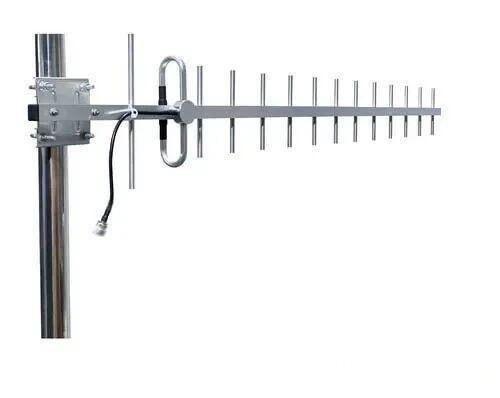 Outdoor Yagi TV Antenna


 Ceiling mount antenna
  Wall mount panel antenna
 Fiberglass Antenna
  Panel Antenna
  Parabolic Antenna
  Yagi Antenna


