

Views: 0 Author: Site Editor Publish Time: 2026-05-13 Origin: Site


A high-quality GNSS Antenna can still deliver poor results. Slow fixes, weak satellite lock, and drifting positions often come from bad integration. GNSS signals are very weak, so placement, PCB layout, ground plane, filtering, housing, and testing all matter. The following integration tips help improve signal quality, reduce interference, avoid redesigns, and achieve more reliable field performance.
GNSS signals arrive at the receiver at extremely low power levels. This makes them far more vulnerable than nearby cellular, Wi-Fi, Bluetooth, or digital noise sources inside the same device. In compact products, the GNSS antenna may sit close to radios, displays, batteries, power supplies, or high-speed circuits. Even a small integration mistake can reduce signal quality.
The result may be longer time-to-first-fix, unstable satellite lock, lower carrier-to-noise ratio, or visible position drift during real use. These issues are rarely caused by the antenna alone. Poor placement, an undersized ground plane, long RF traces, unsuitable enclosure materials, or weak isolation from transmitters can all limit performance after installation.
A datasheet can help compare gain, efficiency, bandwidth, noise figure, polarization, impedance, and supported frequency bands. However, those values do not guarantee the same performance in the final product. Once the antenna is mounted inside a real device, nearby materials and components can detune it, block its radiation pattern, or increase noise coupling.
Integration condition | Possible performance impact |
Metal parts near the antenna | Signal blockage, pattern distortion, detuning |
Battery or display too close | Increased noise and reduced sensitivity |
Poor enclosure material or tight spacing | Frequency shift and weaker reception |
Long or mismatched RF trace | Signal loss, reflection, unstable performance |
Nearby transmit antenna | Receiver desensitization or self-jamming |
Strong GNSS antenna performance depends on how well the full RF environment is controlled. The most important integration factors include antenna architecture, placement and orientation, ground plane quality, RF trace routing, interference control, multipath reduction, enclosure and mounting design, and final validation.
Each factor affects how much usable satellite signal reaches the receiver. For that reason, the final design should be evaluated as one complete system rather than as isolated components.
Choosing between an active and passive GNSS antenna should start with the RF path, not only the antenna size or price. Active antennas include amplification, which helps when the signal must travel through a longer cable, pass through a lossy path, or survive a noisy onboard environment. This can be valuable when the receiver is not close to the antenna or when nearby radios increase the risk of weak signal reception.
Passive antennas can work well when the RF path is short, the layout is compact, and the receiver has a clean connection to the antenna. They also avoid the extra current draw of an integrated amplifier, which can matter in battery-powered devices. However, they leave less room for signal loss, so PCB layout, impedance matching, and component placement become especially important.
Integration factor | Active GNSS antenna may fit when… | Passive GNSS antenna may fit when… |
Cable or trace length | The RF path is longer or has higher loss | The antenna is close to the receiver |
Receiver sensitivity | Extra front-end support is helpful | The receiver can handle weaker input well |
Power consumption | Performance is more important than lowest current | Low power is a strict priority |
Available space | Extra antenna circuitry can be accommodated | The design needs fewer active RF parts |
Interference risk | Filtering or amplification is needed near the antenna | The RF environment is already clean |
Required accuracy | Stable signal quality is critical | Standard positioning is acceptable |
Internal antennas help keep a product compact, protected, and visually clean. However, they are more exposed to the compromises of the device itself. Housing materials, nearby batteries, displays, shields, and board layout can all affect the antenna’s tuning and radiation pattern. This makes early mechanical and PCB coordination essential.
External antennas usually offer more freedom for sky visibility and mounting position. They can be placed away from noisy electronics or elevated for a clearer signal path. Even so, they introduce other integration concerns, including cable loss, connector quality, weather exposure, mounting stability, and whether the installation surface provides useful ground-plane support.
A GNSS Antenna should be selected according to the constraints it must survive after integration. Compact trackers may require efficient designs that tolerate limited PCB space. Anti jamming antennas need antenna locations away from motors, transmitters, and vibration-heavy zones. Vehicle systems often benefit from stable external placement and broader ground-plane support. RTK or surveying devices need stronger phase stability and better multipath control because small signal errors can become visible positioning errors.
For high-precision positioning, a multi-frequency active option such as Multi-Frequency GNSS Antenna can fit applications where multi-system reception, LNA support, and phase-center stability are part of the integration requirement. The best choice is not simply the antenna with the most impressive lab specification. It is the antenna that can maintain reliable signal quality when installed inside the final enclosure, on the final PCB, and in the real operating environment.
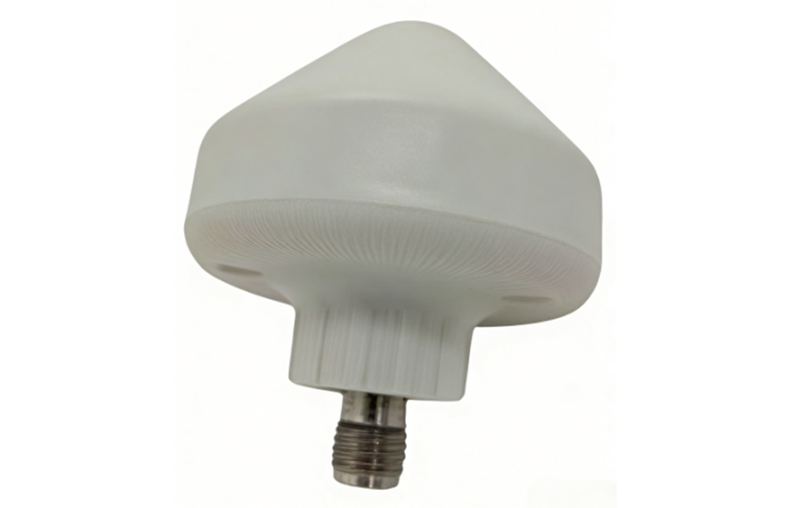
GNSS antennas perform best when they can receive signals from as much of the sky as possible. A broad sky view helps the receiver track more satellites, improves signal geometry, and reduces the chance of weak or intermittent positioning. When the antenna is blocked by buildings, trees, vehicle structures, a user’s body, equipment housings, or nearby metal surfaces, the receiver may see fewer satellites or rely on weaker signals.
Orientation also matters. Patch-style antennas typically need to face upward toward the sky because their radiation pattern is designed around that position. If they are tilted, buried inside the wrong side of an enclosure, or mounted close to obstructive materials, performance can drop quickly. Other antenna types may allow more flexible placement, but they still need to follow their specific integration guidance rather than being positioned only for mechanical convenience.
A GNSS antenna should never be treated as a component that can be squeezed into leftover board or enclosure space. Late placement often forces compromises that are difficult to fix later, such as poor sky exposure, weak ground-plane support, long RF routing, or close proximity to noisy components. Because GNSS signals are already weak, these compromises can turn into longer time-to-first-fix, unstable tracking, or inconsistent accuracy.
The antenna location should be reserved before the PCB and mechanical design are locked. This allows the designer to protect the RF area, maintain clearance from metal and noise sources, and choose an enclosure position that supports reception instead of blocking it.
Placement decision | Why it matters during integration |
Reserve antenna space early | Prevents the antenna from being forced into a compromised location |
Keep the top or sky-facing area clear | Improves satellite visibility and signal consistency |
Avoid dense mechanical structures | Reduces blockage, detuning, and pattern distortion |
Plan antenna location with PCB layout | Helps preserve ground-plane quality and cleaner RF routing |
A placement that works on a test bench may not perform the same way in the field. The final location should reflect how the product is held, mounted, moved, or exposed during normal operation.
For example, wearables may be affected by the user’s body, which can absorb or block signals. Handheld devices may change orientation frequently, so antenna position should tolerate movement. Anti jamming antennas need distance from motors, transmitters, and vibration-heavy areas. Vehicles benefit from elevated, stable mounting locations with fewer nearby obstructions.
Field behavior should influence placement decisions from the start. A GNSS antenna that looks acceptable in a lab prototype may still underperform once the device is worn, enclosed, mounted on a vehicle, or operated near reflective structures.
A GNSS Antenna does not operate in isolation. The PCB around it becomes part of the RF environment, and the ground plane can strongly influence gain, bandwidth, radiation pattern, and overall efficiency. When the ground plane is too small, uneven, or interrupted by dense routing and components, the antenna may struggle to maintain stable reception across the intended GNSS bands.
PCB shape also matters. Small, crowded, or irregular boards can limit the current distribution that the antenna needs for predictable performance. Some patch-style antennas work best with a centered or symmetrical ground plane, while certain surface-mount antennas may be designed for edge or corner placement. The key is to follow the antenna’s integration guidance and make the PCB layout support the antenna, instead of forcing the antenna to adapt to a crowded board.
RF traces should be kept as short and clean as practical. A longer route increases signal loss and gives noise more opportunity to couple into the GNSS path. Since GNSS reception depends on very weak signals, even small losses before the receiver can reduce sensitivity and make positioning less stable.
Impedance control is equally important. The RF path is commonly designed for 50-ohm impedance, and poor matching can cause signal reflection, higher VSWR, reduced receiver sensitivity, and less reliable positioning. Trace routing should also avoid noisy PCB regions, switching power circuits, high-speed digital lines, and paths beneath interference-generating components.
PCB design factor | Integration risk if ignored |
Insufficient ground plane | Lower gain, narrower bandwidth, unstable radiation pattern |
Irregular PCB shape | Less predictable antenna behavior |
Long RF trace | More signal loss and noise exposure |
Poor impedance matching | Reflection, high VSWR, weaker receiver input |
Routing near noisy circuits | Increased interference and reduced signal quality |
Keep-out areas help protect the antenna from detuning, blockage, and unwanted coupling. This space should not be treated as optional empty board area; it is part of the antenna’s working environment. Components placed too close can change the antenna’s effective tuning or distort how it receives satellite signals.
Items that should be kept away from the antenna area include batteries, displays, metal shields, connectors, high-speed digital circuits, and dense mechanical structures. These parts may introduce noise, absorb energy, reflect signals, or physically block the antenna’s radiation path.
Keep-out planning should happen early in PCB layout, before the board becomes crowded. Once major components are fixed, the antenna may be forced into a compromised location with poor clearance, weak ground-plane support, or noisy routing nearby. A layout that protects the antenna area from the beginning gives the GNSS system a much better chance of performing reliably in the final device.
GNSS signals are weak by the time they reach the antenna, so nearby RF energy can easily overwhelm the receiver front end. Cellular, Wi-Fi, Bluetooth, UHF, and other transmitters may operate at much stronger power levels inside the same product. If these signals are not controlled, they can desensitize the GNSS receiver, making satellite acquisition slower and tracking less stable.
Filtering helps protect the GNSS path before unwanted signals create larger system-level problems. Front-end filters can reduce out-of-band energy before it reaches sensitive receiver circuitry. SAW filters are commonly used for selective rejection around GNSS frequencies, while BAW filters may be useful where stronger out-of-band rejection is required. Notch filters can also help when a known nearby band, such as a cellular band, is creating interference.
Interference challenge | Integration response |
Strong cellular signals near GNSS | Add suitable front-end or notch filtering |
Wi-Fi or Bluetooth noise in compact layouts | Improve RF separation and filtering strategy |
Receiver desensitization | Reduce unwanted energy before the receiver input |
Multiple radios in one enclosure | Treat filtering as part of the system design, not an optional add-on |
GNSS antennas should be separated from transmitting antennas whenever the product layout allows. Cellular, Wi-Fi, Bluetooth, UHF, and video transmission antennas can create self-jamming when they are placed too close to the GNSS path. This does not always cause complete failure; more often, it appears as weak fixes, unstable tracking, longer reacquisition time, or reduced positioning accuracy.
Good isolation is a layout and system-integration decision. Antenna spacing, orientation, shielding, ground layout, and cable routing should all be reviewed together. In Anti jamming antennas, trackers, connected vehicles, and industrial devices, GNSS performance often depends on how well the design team prevents the product’s own radios from becoming the strongest source of interference.
Multipath occurs when satellite signals reflect from buildings, metal surfaces, vehicle bodies, water, or nearby structures before reaching the antenna. The receiver may then process delayed or distorted versions of the signal, which can increase positioning error. Urban streets, construction sites, ports, warehouses, and vehicle environments are especially challenging because reflective surfaces surround the antenna from several directions.
Mounting choices can reduce this risk. A stable, elevated position with better sky exposure helps the antenna receive more direct satellite signals. Suitable ground-plane support and the right GNSS Antenna design can also improve resistance to reflected energy, especially in applications that require consistent accuracy.
Validation should measure more than whether the device can get a position fix. A weak integration may still produce a location result, but that result can be slow, unstable, or inaccurate under normal operating conditions. Instead, GNSS antenna testing should look at signal quality, satellite visibility, fix behavior, and consistency across different device orientations.
Metric to check | What it can reveal |
Satellite count | Whether the antenna has enough sky visibility |
Carrier-to-noise ratio | Whether the received signals are strong and clean |
Time-to-first-fix | Whether acquisition is delayed by weak signals or noise |
Fix stability | Whether tracking remains reliable during operation |
Position accuracy | Whether layout, multipath, or interference is affecting results |
Orientation performance | Whether the antenna works consistently in real use |
Weak results in these areas can point to placement problems, poor ground-plane support, RF trace loss, insufficient filtering, or enclosure-related detuning. Monitoring these metrics during development helps identify integration issues before the product reaches the field.
A bare-board prototype can perform very differently from the final assembled product. Once the GNSS Antenna is placed inside a housing, its behavior may change because of enclosure materials, internal spacing, nearby components, mounting height, or surrounding mechanical structures. Plastic, metal coatings, brackets, displays, and batteries can all affect signal reception if they sit too close to the antenna.
For exposed installations, an active outdoor antenna such as IP66 GNSS Active Antenna may be considered when the design requires active amplification, weather-resistant housing, and a secure external connector. Testing should still be performed on the complete device, not only on the antenna, module, or open PCB. The final enclosure, cable routing, mounting hardware, and expected installation position should all be included in performance checks.
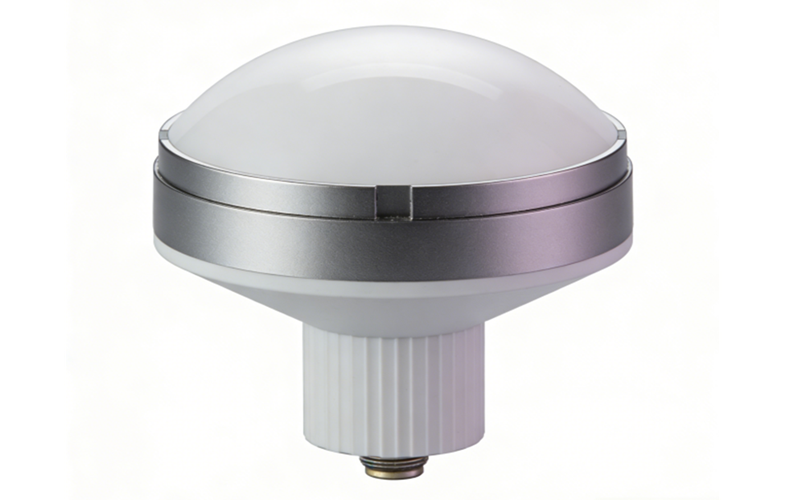
Bench testing and open-sky testing are useful starting points, but they cannot fully represent real-world operation. Field testing should include open sky, urban or obstructed areas, nearby interference sources, expected device orientations, and final installation locations.
These conditions show whether the integration can maintain reliable GNSS Antenna performance when exposed to the same signal blockage, reflections, and RF noise the product will face after deployment.
Maximizing GNSS Antenna performance depends on smart integration, not antenna choice alone. Strong results come from early planning, proper placement, clean PCB design, interference control, and real-device testing. Zhengzhou LEHENG Electronic Technology Co., Ltd. provides GNSS antenna solutions that support high-precision positioning, active signal reception, and practical integration across outdoor, vehicle, industrial, marine, and unmanned applications.
A: GNSS Antenna performance depends on placement, ground plane quality, RF routing, interference control, and final enclosure design.
A: An active GNSS Antenna fits longer RF paths, higher cable loss, or layouts with strong nearby interference.
A: Poor PCB layout can weaken the GNSS Antenna through signal loss, detuning, impedance mismatch, or noise coupling.
A: Final-device testing shows how the GNSS Antenna performs with real housing, mounting, orientation, and interference conditions.


 External GPS Antenna
  Ceramic antenna
  Internal GPS Antenna
  Surveying Antenna
 Magnet Antenna
  Patch Antenna
  Rubber Antenna
  Screw Antenna
  Spring Antenna
  Other Indoor Coverage Antenna&outdoor Wlan Antenna
 2.4G Antenna
  5.8G Antenna

 Outdoor Yagi TV Antenna


 Ceiling mount antenna
  Wall mount panel antenna
 Fiberglass Antenna
  Panel Antenna
  Parabolic Antenna
  Yagi Antenna


